
Download Deblank – AI‑Powered Design Tool for Creative Professionals
Overview
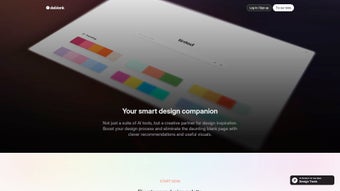
In today’s fast‑paced visual‑communication landscape, the most intimidating moment for designers, marketers, and even hobbyists is the blank canvas that greets them at the start of any project. That empty space often triggers decision fatigue, slows down the creative flow, and can turn a simple task into a prolonged hunt for inspiration. Deblank eliminates this bottleneck by delivering an AI‑driven, browser‑based design companion that instantly produces colour palettes, font pairings, image collages, and realistic mockups the moment you describe your concept.
Because it lives entirely in the cloud, you can access Deblank from any device—whether you’re on a Windows desktop, a macOS laptop, an Android tablet, or an iPhone—without the need for bulky installations, license keys, or regular updates. The platform’s core mission is to transform the “starting from scratch” anxiety into a spark of creativity that can be nurtured, refined, and exported in just a few clicks. Whether you are building a brand identity, crafting a social‑media carousel, preparing a pitch deck, or designing a UI prototype, Deblank supplies a curated set of suggestions that you can accept as‑is, tweak, or replace with your own assets.
All generated concepts are automatically saved to a personal library, allowing you to revisit, edit, or export them to industry‑standard tools such as Photoshop, Figma, Canva, or Adobe XD. In addition, the secure cloud storage encrypts every project, ensuring that your creative work remains private and protected. By combining instant AI inspiration with seamless cross‑platform accessibility, Deblank helps you accelerate the ideation phase, reduce repetitive decision‑making, and keep your workflow moving at the speed of thought.
Key Features, Benefits, and Drawbacks
Feature List
- AI‑Generated Colour Palettes: Instantly receive harmonious colour schemes based on mood, industry trends, or custom HEX values, complete with exportable swatches.
- Smart Font Pairings: The engine suggests complementary typefaces, size hierarchies, and usage guidelines to maintain visual balance.
- Dynamic Image Collage Builder: Upload up to 20 images and let Deblank automatically arrange them into balanced grids, artistic overlays, or storytelling mosaics.
- Real‑World Mockups: Preview your concepts on devices, billboards, packaging, apparel, and interior scenes without leaving the browser.
- Personal Design Library: Every AI suggestion is saved to a cloud‑based library that can be organised by project, client, or theme.
- One‑Click Export: Export assets as PNG, SVG, or layered PSD files, preserving individual layers for colour, typography, and imagery.
- Cross‑Platform Accessibility: Works on any modern browser, guaranteeing full functionality on Windows, macOS, Linux, Android, and iOS.
- Secure Cloud Storage: All data is encrypted in transit (TLS) and at rest, complying with industry‑standard security practices.
- Collaboration Links: Generate shareable URLs for team members or clients to view or edit concepts in real time.
- Continuous Updates: New AI models, mockup libraries, and export formats are rolled out automatically, keeping the tool fresh without manual updates.
Pros
- Accelerates the ideation phase with instant, high‑quality AI suggestions.
- Browser‑first architecture eliminates installation hurdles and ensures instant access.
- Extensive mockup library saves time on presentation and client‑review stages.
- Generous free tier supports freelancers and small teams.
- Export formats are fully compatible with major design software, facilitating seamless hand‑offs.
- Secure, encrypted cloud storage protects intellectual property.
Cons
- Advanced customisation (deep typographic controls, batch processing) requires a paid subscription.
- Continuous internet connection is mandatory; offline work is not supported.
- AI‑generated ideas may feel generic for highly specialised or niche industries.
- Limited batch export capabilities can slow down large‑scale campaigns.
- Performance depends on browser speed and device resources, which may vary on older hardware.
Installation, Usage, Compatibility, and Frequently Asked Questions
Installation & Usage Instructions
Getting started with Deblank is designed to be frictionless. Navigate to deblank.io and register using an email address or a Google account. After confirming your email, you are taken to a clean dashboard where a prominent “New Project” button awaits.
Click it, select a project type (branding, social media, UI mockup, presentation, etc.), and provide a brief description, target audience, or any colour constraints you have. Within seconds, the AI engine produces a curated set of colour palettes, font pairings, and layout ideas. Hover over any suggestion to view a larger preview, drag elements onto a custom canvas, or click “Save to Library” to keep the concept for later refinement.
When you are satisfied, choose an export format—PNG for quick images, SVG for scalable graphics, or layered PSD for full Photoshop editing—and click “Download.” Because everything lives in the cloud, you can return to the same project from any device, make adjustments, and re‑export without losing any previous work. The interface also offers a “History” panel that logs every change, enabling you to revert to earlier versions if needed. For teams, the “Collaboration Link” feature creates a shareable URL with optional view‑only or edit permissions, streamlining client feedback cycles.
Compatibility & System Requirements
Deblank is a pure web application, which means it runs on any operating system that supports modern browsers. It has been thoroughly tested on Chrome, Firefox, Edge, and Safari across Windows 10/11, macOS Ventura and later, as well as mobile browsers on Android 12+ and iOS 15+. No additional plugins, extensions, or runtime environments are required.
The platform automatically adapts its UI for tablets and smartphones, ensuring that designers can switch between a desktop workstation and a mobile device without losing functionality. For optimal performance, we recommend using the latest browser version, enabling hardware acceleration, and having a stable broadband connection of at least 5 Mbps. Low‑spec devices may experience slightly longer rendering times for complex mockups, but the core AI suggestion engine remains responsive.
Frequently Asked Questions
Is Deblank completely free?
Deblank offers a robust free tier that includes unlimited AI colour and font suggestions, up to 10 saved projects, and standard export options. A premium subscription unlocks advanced typography controls, larger mockup libraries, priority cloud storage, and batch export features.
Can I use Deblank offline?
Because Deblank runs entirely in the browser and relies on cloud‑based AI models, an active internet connection is required for generating suggestions and syncing your library. Offline editing isn’t supported at this time.
What file formats are available for export?
Exports are available in PNG, SVG, and layered PSD formats. The PSD export includes separate layers for colours, typography, and images, making it easy to continue work in Photoshop or any compatible editor.
Is my design data secure?
All user data is encrypted in transit (TLS) and at rest. Deblank follows industry‑standard security practices and does not share your projects with third parties without explicit permission.
Can I integrate Deblank with other design tools?
Yes. Exported assets can be imported directly into Figma, Adobe XD, Canva, or any tool that accepts PNG, SVG, or PSD files. The personal library also provides a shareable link for collaborative workflows.
How often are new features added?
Deblank receives continuous updates every 4‑6 weeks. New AI models, expanded mockup collections, and additional export formats are rolled out automatically, so users always have the latest capabilities without manual installation.
Conclusion – Take the Blank Canvas Out of Your Workflow
Deblank delivers on its promise to be a true creative ally, turning the dreaded blank canvas into a launchpad for inspiration. By harnessing AI to generate colours, fonts, and layouts, it removes the guesswork that slows down early‑stage design, allowing you to allocate more time to refinement and storytelling. Its browser‑first approach guarantees instant accessibility across Windows, macOS, Linux, Android, and iOS, while secure cloud storage ensures that every idea you generate is safely archived for future use.
Although power users may eventually outgrow the free tier’s limits, the premium plan remains reasonably priced and adds valuable depth for agencies and frequent creators. If you’re looking for a tool that speeds up ideation, consolidates your design references, and integrates smoothly with your existing workflow, Deblank is worth a try. Click the button below to sign up, explore the free features, and experience how AI can reshape the way you design.
Pros: Rapid AI suggestions, browser‑based convenience, generous free tier, secure cloud storage.
Cons: Requires internet, limited offline features, premium needed for deep customization, batch export limitations.



.png)



